
SignServer digital signing server
Centralised, no USB tokens.
On-premise centralised signing server: signing keys kept on HSMs, automated PDF, XML and JSON signing via REST API or Message Queue, no USB tokens.
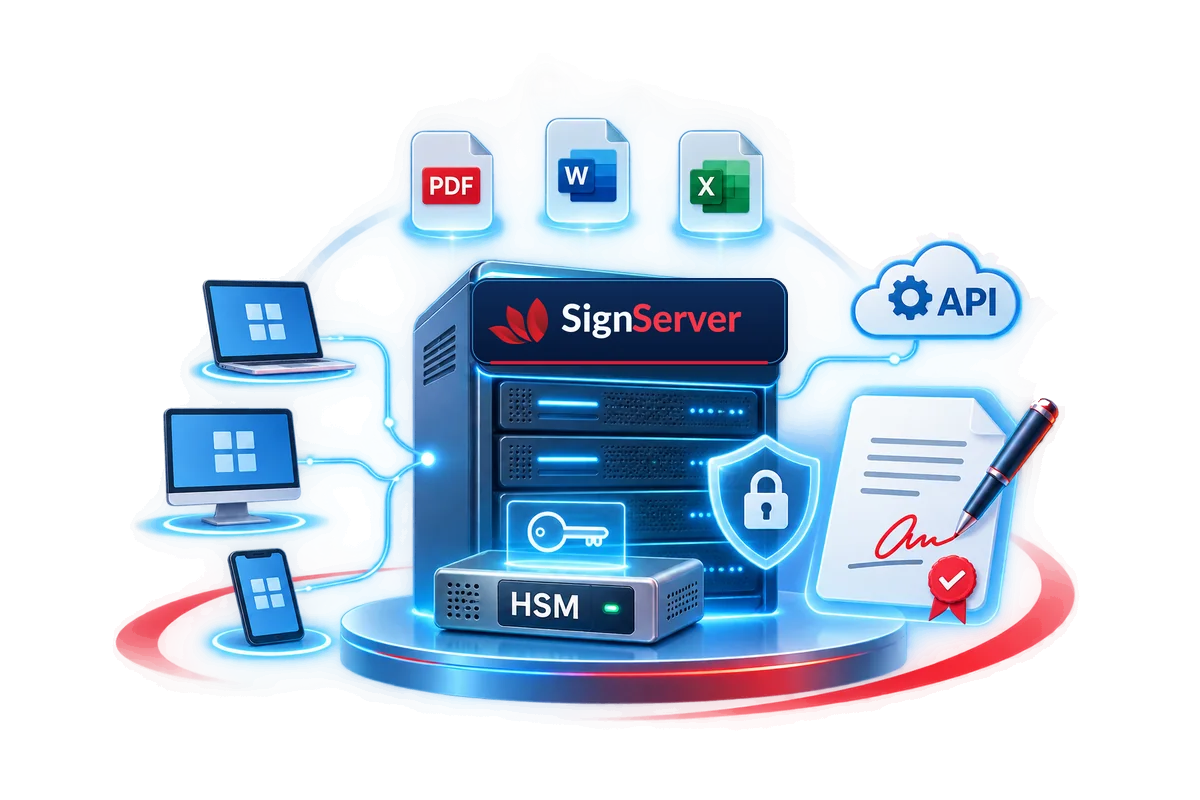
What does SignServer help with?
On-premise centralised signing server: signing keys kept on HSMs, automated PDF, XML and JSON signing via REST API or Message Queue, no USB tokens.
One certificate
Your organisation's certificate, shared by every business application.
No USB tokens
Users need no signing device and signing no longer depends on whoever holds the token.
Sign anywhere
In any browser and on any device: desktop, mobile, tablet.
Web admin
Manage HSMs, users and certificates; report on and analyse signing transactions.
Open integration
Applications call SignServer through a RESTful API or Message Queue.
Ready-made libraries
.NET / Java Client API to process and parse files on the application side.
What is SignServer?
SignServer is a centralised digital signing server developed by CyberLotus. It brings your organisation's signing keys onto a central server backed by an HSM; every business application calls it to sign and validate digital signatures automatically, with full logging and no USB tokens.
With SignServer you need just one organisational certificate for every application to sign: e-invoicing software, insurance core systems, e-contracts and more. The software is registered for copyright in Vietnam under the name CyberSign.
The problem with USB tokens at every site
When each branch or outlet keeps its own USB token, scaling up is hard and signing activity is difficult to control. SignServer moves signing to a central, automated model:
| USB tokens at every site | With SignServer |
|---|---|
| Signing depends on the token holder and stops when they are away | No USB tokens, no dependence on individuals |
| No shared log of who signed what, and when | Central logs and reports in the web admin |
| Applications cannot sign in batches on their own | Automated signing per transaction or in batches, 24/7 |
| Every new outlet means another token and more risk | New outlets need configuration only, no installation |
Typical use cases
Restaurant and retail chains – signing e-invoices
- POS terminals across many outlets generate transactions.
- The e-invoicing software sends invoices to SignServer.
- SignServer signs them automatically and centrally with the company's certificate.
- Digitally signed e-invoices are issued.
Opening a new outlet requires no extra token or installation; the whole chain signs with a single company certificate.
Insurance companies – signing certificates and e-documents
- A new insurance policy is created.
- The insurance core system sends a signing request to SignServer.
- SignServer signs it automatically and centrally.
- The digitally signed insurance certificate is issued.
Certificates are issued as soon as a policy is approved; signatures and timestamps are verified when electronic records are received.
Integration architecture
- HSM 1…n: signing keys stored on FIPS 140-2 certified devices (provided by the customer), connected via PKCS#11.
- File Engine: signs and validates signatures on files.
- Byte Engine: hash and byte signing.
- Web Admin: administration and reporting.
- Monitoring: Grafana dashboards and alerts.
- Business applications (invoices, certificates, contracts…) call SignServer via REST API or Message Queue, or use the Client API (.NET / Java libraries).
- Platform: Linux, Docker, VMware; MSSQL, Oracle or MariaDB databases.
The customer provides the servers (virtual or physical) and HSM; CyberLotus supplies the software, integration and technical support. Users can sign from any browser or device without a USB token.
SignServer packages
| Feature | Standard CBS-ONP-STD | Advanced CBS-ONP-ADV | Premium CBS-ONP-PRE |
|---|---|---|---|
| RESTful API integration | Yes | Yes | Yes |
| Message Queue integration | – | – | Yes |
| Monitoring and alerts | – | Yes | Yes |
| CRL download and management | – | – | Yes |
| Concurrent transactions | Limited | Limited | Unlimited |
| Remote signing – upgrade to SignHub / RsGate* | Extension | Extension | Extension |
* Not included in the SignServer licence: upgrade to the SignHub platform or add the RsGate component, charged separately.
Licences are per server (virtual or physical) and come in two forms: PE – perpetual, and SU – annual subscription. Perpetual licences come with annual maintenance and technical support (CBS-ONP-SUP): bug fixes and patches; 5x8 support by phone, email, remotely or on-site in Hanoi. Pricing: contact us.
Extending to remote signing
When individual customers need to sign on their phones, you can upgrade to the SignHub platform or add the RsGate component to connect to CAs offering remote signing services (RSSP). Individual signers authenticate on their mobile devices.
Regulatory compliance
- Decree 23/2025/ND-CP on electronic signatures and trust services.
- Circular 15/2025/TT-BKHCN on technical requirements for signing software and signature-validation software.
Focused on your business.
Five core capability groups, deployed on-premise in your own infrastructure.
High-speed signing
Sign PDF, XML, CMS and JSON files; hash (byte) signing; long-term validation (LTV). Automated per transaction or in batches, 24/7.
Certificate validation
Check validity period, revocation status via CRL/OCSP, and the certificate's purpose and scope of use.
Signature validation
Verify signature validity, data integrity and attached timestamps when receiving electronic records.
System administration
Manage users, certificates and services in the web admin; central reports and statistics on signing.
Monitoring and alerts
Monitor the system in Grafana; email alerts when the database connection drops or a certificate is about to expire.
A clear implementation journey.
You provide the servers and HSM; CyberLotus supplies the software, integration and technical support.
Choose a package
Review the applications that need signing and choose Standard, Advanced or Premium and the licence type.
Install and connect the HSM
Install SignServer on a virtual or physical server, connect the HSM via PKCS#11 and load your certificate.
Integrate and test
Business applications call SignServer via REST API, Message Queue or the .NET / Java Client API.
Handover and support
Administrator training; maintenance and 5x8 support by phone, email, remotely or on-site in Hanoi.
Learn more about SignServer.
Documents for download.
Brochure SignServer
Phần mềm máy chủ ký số
Download